S3 Standard-IA lifecycle: keep the 46% saving
Published · Updated · OhChimp Engineering
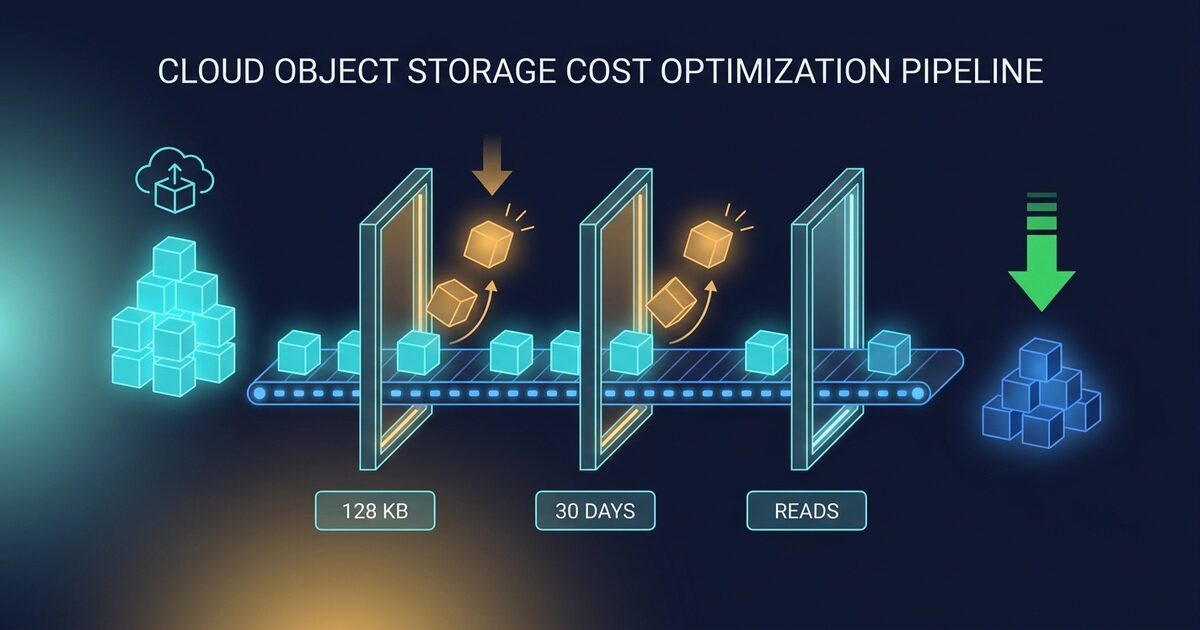
In us-east-1, S3 Standard-IA lists at $0.0125 per GB-month against S3 Standard's $0.023 for the first 50 TB, so moving cold data there cuts the at-rest rate by about 46%. Rates vary by region. Three other billing rules decide whether that discount survives contact with your bucket, and a lifecycle rule written without them can more than double what you pay.
Why Standard-IA is cheaper, and what it charges you instead
Standard-IA holds your objects across the same three-or-more Availability Zones as Standard, at the same millisecond access. In us-east-1 it lists at $0.0125 per GB-month against Standard's $0.023 for the first 50 TB. One Zone-IA drops to $0.01 and keeps a single Availability Zone, which is a durability choice rather than a pricing one. Every figure below uses those us-east-1 list rates.
AWS prices that discount by attaching three charges that Standard does not have.
| Rule | S3 Standard | S3 Standard-IA |
|---|---|---|
| Storage, first 50 TB | $0.023/GB | $0.0125/GB |
| Minimum billable object | None | 128 KB |
| Minimum storage duration | None | 30 days |
| Retrieval fee | None | $0.01/GB |
Each of those is a gate: an object that clears all three saves you $0.0105 per GB-month, and one that misses any of them costs more than it did in Standard.
The retrieval fee erases the most and gets checked the least. Your gross saving is $0.0105 per GB-month. Reading that GB back costs $0.01. So a full read once a month leaves you $0.0005, which is 4.8% of the saving you moved the data for. Read it twice and Standard was cheaper.
The break-even sits at 1.05 full reads per month. "Infrequently accessed" on your bill means once a month, which is stricter than what most teams mean when they look at a bucket and call it cold.
The 30-day charge that day-zero transitions did not remove
On 16 July 2026, AWS removed the 30-day minimum for transitions into Standard-IA and One Zone-IA. You can now write a lifecycle rule with Days: 0 and move objects the day they land. The announcement suggests backups, log analytics, and compliance workloads "where data becomes cold within hours or days."
The minimum storage duration is unchanged at 30 days, and the S3 storage class documentation is explicit about what triggers it: objects "deleted, overwritten, or transitioned to a different storage class before 30 days will incur the normal storage usage charge plus a pro-rated charge for the remainder of the 30-day minimum."
So an object you transition on day 0 and expire on day 7 bills 30 days of Standard-IA.
Standard-IA puts a 30-day floor under the bill whatever happens, and Standard charges only for the days the object exists.
Standard for L days:     $0.023 x L/30 per GB
Standard-IA from day 0:  $0.0125 flat per GB, for any L up to 30
Equal when:              L = 30 x 0.0125 / 0.023 = 16.3 days
An object that lives fewer than about 16 days costs more in Standard-IA than in Standard, even though you paid nothing to move it and the rate is 46% lower. One Zone-IA moves that line to 13 days.
Price the workload AWS named: say you write 1 TB of logs a month and expire them at 7 days.
| Setup | Monthly cost (1 TB of logs, us-east-1) |
|---|---|
| S3 Standard, expire at 7 days | $5.50 |
| Standard-IA from day 0, expire at 7 | $12.80 |
| Plus transitions, assuming 5 MB objects | $14.90 |
That is 2.7x the bill for the same seven days of logs, on the exact use case the July 2026 announcement calls out. That third row scales with object count rather than bytes, so halve the object size and the request line doubles. Day-0 transitions fit data that goes cold in hours and then stays for months, like a compliance archive you stop reading immediately, but not data you delete next week.
If your log volume is the thing driving this, the storage tier is usually the smaller half of the bill. Indexing and ingestion charges tend to dominate, which is a different lever entirely.
The 128 KB floor, and the filter that switches it off
The second gate is object size, and it protects you by default.
Since September 2024, S3 refuses to transition any object under 128 KB to any storage class. AWS states the reason plainly: you pay a transition request per object, so on small objects the request outruns the storage saving.
Standard-IA also bills a minimum of 128 KB per object. A 20 KB object in Standard-IA is billed as 128 KB, so its effective rate is $0.0125 x (128/20), which is $0.08 per GB-month of real data. Standard charges $0.023 for the same bytes.
Set the two equal and the crossover lands at 69.6 KB. Below that size, Standard-IA costs more per real byte than Standard, and no amount of coldness fixes it.
| Object size | Billed as | Standard-IA vs Standard |
|---|---|---|
| 20 KB | 128 KB | 3.48x more expensive |
| 64 KB | 128 KB | 1.09x more expensive |
| 70 KB | 128 KB | roughly break-even |
| 128 KB | 128 KB | 0.54x, the full saving |
| 1 MB | 1 MB | 0.54x, the full saving |
The 128 KB default keeps you above that line. The way people fall below it is by adding an object-size filter to catch "the rest of the bucket." An ObjectSizeGreaterThan of 1 byte is the documented way to allow small transitions, and it hands you every object on the losing side of the table.
Then there is the transition request itself, at $0.01 per 1,000 objects into Standard-IA. It is a one-time charge, so compare it against the monthly saving it buys.
| Object size | Monthly saving | Months to repay the request |
|---|---|---|
| 128 KB | $0.00000128 | 7.8 |
| 1 MB | $0.0000103 | 1.0 |
| 10 MB | $0.000103 | 0.1 |
An object sitting right on the 128 KB floor spends nearly eight months earning back the single request that moved it. At 1 MB the request pays for itself in a month. Mean object size decides whether a bucket is worth touching, however many total bytes it holds.
Inherited buckets carry one more surprise. Lifecycle configurations created before September 2024 keep the old behavior, where objects under 128 KB could still transition into the Glacier classes. That grandfathering ends the moment you create, edit, or delete any rule in the configuration. So the first edit you make to an old bucket can change how its existing rules treat small objects, in a change that looks like it only added one rule.
Where Intelligent-Tiering changes the answer
S3 Intelligent-Tiering exists to make this decision for you, and it does remove two of the three gates. It carries no minimum storage duration and no retrieval fees, so the 16.3-day cliff and the once-a-month read limit both stop applying. An object that has gone 30 consecutive days without a read moves to the Infrequent Access tier, priced the same as Standard-IA. Data whose access pattern you genuinely cannot predict belongs there.
It charges a monitoring and automation fee instead, at $0.0025 per 1,000 objects a month. That is a per-object charge sitting against a per-byte saving, so it lands hardest on exactly the buckets the 128 KB floor already warns you about.
The fee is $0.0000025 per object per month, and a cold object saves $0.0105 per GB-month in the Infrequent Access tier. Those are equal at 249.7 KB.
So between 128 KB and roughly 250 KB, Intelligent-Tiering spends more watching an object than tiering it ever returns. Below 128 KB the question does not arise, because objects that small are not monitored at all and sit in the Frequent Access tier permanently, which is the same blind spot lifecycle rules have.
A bucket of 5 MB objects is comfortably clear of that line and is a fine candidate either way. A bucket of 200 KB objects clears the transition floor and still loses money under Intelligent-Tiering, so mean object size decides this question too.
Where Glacier Instant Retrieval undercuts Standard-IA
One storage class sits below Standard-IA and still answers in milliseconds. S3 Glacier Instant Retrieval keeps objects across the same three-or-more Availability Zones, returns them at the same millisecond latency, and lists at $0.004 per GB-month against Standard-IA's $0.0125. It bills the same 128 KB minimum per object, so the small-object penalty works the same way. The lower rate moves the crossover against Standard down to 22.3 KB, from the 69.6 KB that applies to Standard-IA.
AWS sets a 90-day minimum storage duration on Glacier Instant Retrieval against 30 days for Standard-IA. Price both floors and the longer one bills less.
| Class | Rate | Minimum duration | Smallest possible bill |
|---|---|---|---|
| Standard-IA | $0.0125/GB-mo | 30 days | $0.0125 per GB |
| Glacier Instant Retrieval | $0.004/GB-mo | 90 days | $0.012 per GB |
Ninety days at $0.004 comes to $0.012, under the $0.0125 that Standard-IA charges for its thirty. So Glacier Instant Retrieval costs less at rest than Standard-IA whatever the object's lifetime, and the gap widens the longer the object stays.
Retrieval is the charge that decides between them. Reading a GB back costs $0.03 from Glacier Instant Retrieval against $0.01 from Standard-IA. Glacier Instant Retrieval saves $0.0085 per GB-month at rest and hands $0.02 per GB back on every read, so the two cost the same at 0.425 full reads a month, or one read every 2.4 months. Read more often than that and Standard-IA is the cheaper of the two.
Set that against the 1.05-read line from earlier, and Standard-IA owns a narrow strip of the range.
| Full reads per month | Cheapest class |
|---|---|
| Under 0.425 | Glacier Instant Retrieval |
| 0.425 to 1.05 | Standard-IA |
| Over 1.05 | S3 Standard |
That strip spans a factor of 2.5. AWS designs Glacier Instant Retrieval for data "accessed once a quarter", which works out to 0.33 reads a month and lands inside its own half of the line.
Transition requests into Glacier Instant Retrieval cost $0.02 per 1,000 against $0.01 into Standard-IA. That extra cent per thousand objects buys $0.0085 per GB-month of extra saving, and mean object size again decides how fast it comes back.
| Object size | Extra saving per month | Months to repay the extra request |
|---|---|---|
| 128 KB | $0.00000104 | 9.6 |
| 1 MB | $0.0000083 | 1.2 |
| 10 MB | $0.000083 | 0.1 |
Swap STANDARD_IA for GLACIER_IR in the StorageClass field to point a rule there instead. The rest of the rule is identical, including the NoncurrentVersionTransitions clause and the merge-before-you-put discipline below.
Find your candidates by hand
The three gates map onto three measurements: mean object size, how long objects live, and how much gets read.
Size and volume come first. CloudWatch publishes S3 bucket metrics daily at no charge, and mean object size is the ratio of two of them.
# Bytes sitting in the Standard class right now.
aws cloudwatch get-metric-statistics \
  --namespace AWS/S3 \
  --metric-name BucketSizeBytes \
  --dimensions Name=BucketName,Value=my-bucket \
               Name=StorageType,Value=StandardStorage \
  --start-time "$(date -u -d '3 days ago' +%Y-%m-%dT%H:%M:%SZ)" \
  --end-time "$(date -u +%Y-%m-%dT%H:%M:%SZ)" \
  --period 86400 \
  --statistics Average \
  --output table

# Object count. Note the StorageType differs: AllStorageTypes, not StandardStorage.
aws cloudwatch get-metric-statistics \
  --namespace AWS/S3 \
  --metric-name NumberOfObjects \
  --dimensions Name=BucketName,Value=my-bucket \
               Name=StorageType,Value=AllStorageTypes \
  --start-time "$(date -u -d '3 days ago' +%Y-%m-%dT%H:%M:%SZ)" \
  --end-time "$(date -u +%Y-%m-%dT%H:%M:%SZ)" \
  --period 86400 \
  --statistics Average \
  --output table
Divide bytes by objects. Under 128 KB, stop: the bucket cannot transition by default and should not be forced to. Under 1 MB, expect the request fee to eat a real slice of the first months. These metrics emit once every 24 hours, so ask for at least a couple of days or you may get a single data point back.
That ratio is a mean, and a mean hides its own distribution. A bucket of 2 MB objects and a bucket that is half 10 MB parquet and half 30 KB manifests can report the same average. S3 Storage Lens gives you the free size-bucket breakdown if you want the shape rather than the midpoint.
Next, find out whether the bucket is actually cold. BytesDownloaded is the honest answer, and it is opt-in per bucket under S3 request metrics.
aws cloudwatch get-metric-statistics \
  --namespace AWS/S3 \
  --metric-name BytesDownloaded \
  --dimensions Name=BucketName,Value=my-bucket Name=FilterId,Value=EntireBucket \
  --start-time "$(date -u -d '30 days ago' +%Y-%m-%dT%H:%M:%SZ)" \
  --end-time "$(date -u +%Y-%m-%dT%H:%M:%SZ)" \
  --period 86400 \
  --statistics Sum \
  --output table
Sum that over the month and divide by the bytes held. Above roughly 1.05, the retrieval fee costs more than the storage saves. A bucket with no request metrics configured is unmeasured, which is a different thing from cold, and guessing here is how a saving turns into a bill.
Last, read the rules the bucket already has. An expiration rule tells you the object lifetime, which is the 16.3-day gate.
aws s3api get-bucket-lifecycle-configuration --bucket my-bucketA bucket that expires objects at 14 days should keep them in Standard. A bucket with no expiration at all, holding million-byte objects nobody reads, is the one you came for.
To sweep an account rather than one bucket, list them first and check which already carry a transition rule.
for b in $(aws s3api list-buckets --query 'Buckets[].Name' --output text); do
  rules=$(aws s3api get-bucket-lifecycle-configuration --bucket "$b" \
            --query 'Rules[?Status==`Enabled`].Transitions' --output text 2>/dev/null)
  [ -z "$rules" ] && echo "$b: no enabled transition rule"
done
Bucket-level calls are regional in effect but the bucket list is global, so this walks the whole account in one pass.
Add the rule without clobbering your retention
put-bucket-lifecycle-configuration replaces the entire configuration. Send a payload with one transition rule at a bucket that already has an expiration rule, and you have just deleted the expiration rule, along with the retention policy somebody wrote to satisfy an auditor.
So read the current rules first, and build the new payload on top of them.
# Capture what is there now. This file is also your rollback.
aws s3api get-bucket-lifecycle-configuration --bucket my-bucket \
  > lifecycle-before.json 2>/dev/null || echo '{"Rules":[]}' > lifecycle-before.json

cat lifecycle-before.json
Now write the merged configuration, keeping every existing rule and appending the transition.
cat > lifecycle-after.json <<'JSON'
{
  "Rules": [
    {
      "ID": "existing-expire-old-logs",
      "Status": "Enabled",
      "Filter": {"Prefix": "logs/"},
      "Expiration": {"Days": 365}
    },
    {
      "ID": "transition-cold-to-standard-ia",
      "Status": "Enabled",
      "Filter": {},
      "Transitions": [{"Days": 30, "StorageClass": "STANDARD_IA"}],
      "NoncurrentVersionTransitions": [
        {"NoncurrentDays": 30, "StorageClass": "STANDARD_IA"}
      ]
    }
  ]
}
JSON

aws s3api put-bucket-lifecycle-configuration \
  --bucket my-bucket \
  --lifecycle-configuration file://lifecycle-after.json
Three details in that payload are doing real work.
Days: 30 rather than Days: 0, even though day 0 is now legal. Transitioning at 30 days means an object still in the bucket has already proven it lives long enough to clear the 30-day minimum duration, so the gate stops being a risk you carry.
NoncurrentVersionTransitions alongside Transitions. On a versioned bucket, Transitions moves only current versions. Old versions are frequently the majority of the bytes and the coldest data you own, and they are counted in the BucketSizeBytes figure you just used to size the saving. Leave that clause out and the rule cannot deliver the number you calculated. It is inert on an unversioned bucket, so it costs nothing to include.
An empty Filter, which applies the rule bucket-wide and keeps the 128 KB default in force. Reach for ObjectSizeGreaterThan only to raise that floor, never to lower it.
If the bucket reports a TransitionDefaultMinimumObjectSize, carry it explicitly. It rides on the same call and sits outside the Rules payload, so a re-put without it reverts the bucket to all_storage_classes_128K and changes how every other transition rule treats small objects.
aws s3api put-bucket-lifecycle-configuration \
  --bucket my-bucket \
  --lifecycle-configuration file://lifecycle-after.json \
  --transition-default-minimum-object-size varies_by_storage_class
Rollback restores the file you captured before you started.
aws s3api put-bucket-lifecycle-configuration \
  --bucket my-bucket \
  --lifecycle-configuration file://lifecycle-before.json

# If the bucket had no configuration at all, delete instead of restoring.
aws s3api delete-bucket-lifecycle --bucket my-bucket
That stops future transitions. Objects that already moved stay in Standard-IA, and lifecycle rules only ever move objects down the waterfall, so pulling one back means copying it over itself.
aws s3 cp s3://my-bucket/path/ s3://my-bucket/path/ \
  --recursive --storage-class STANDARD --metadata-directive COPY
Copying out inside the 30-day window bills the prorated remainder of the minimum duration, so a rollback on day 3 pays for 27 days you will not use. Test the rule on one prefix before you point it at the bucket.
A quick decision tree
Transition a bucket to Standard-IA only when its mean object size clears 128 KB, its objects live past 30 days, and it is read less than about once a month per GB held. Miss any one of the three and S3 Standard costs less. Read it less than once every 2.4 months and Glacier Instant Retrieval costs less again.
graph TD
  A[Bucket in S3 Standard] --> B{Mean object size > 128 KB?}
  B -- No --> C[Stay on Standard: the 128 KB minimum inverts the rate]
  B -- Yes --> D{Read less than about once a month?}
  D -- No --> E[Stay on Standard: the $0.01/GB retrieval fee eats the saving]
  D -- Yes --> F{Objects live past 30 days?}
  F -- No --> G[Stay on Standard: the 30-day minimum duration bills more than the object lives]
  F -- Yes --> K{Read less than once every 2.4 months?}
  K -- Yes --> L[Transition at 30 days to Glacier Instant Retrieval: same millisecond access at $0.004/GB]
  K -- No --> H{Mean object size > 1 MB?}
  H -- No --> I[Transition at 30 days to Standard-IA, expect months to repay the request fee]
  H -- Yes --> J[Transition at 30 days to Standard-IA, merged onto the existing rules]
Common questions
Is S3 Standard-IA always cheaper than S3 Standard?
No. The at-rest rate is about 46% lower ($0.0125 against $0.023 per GB-month in us-east-1), and three other charges can more than cancel it. Objects under 128 KB are billed as 128 KB, which makes anything smaller than 69.6 KB cost more per real byte than Standard. Objects deleted before 30 days still bill 30 days. Reading a GB back costs $0.01 against a $0.0105 monthly saving, so roughly one full read a month erases it.
Can I transition objects to Standard-IA on day 0 now?
Yes. AWS removed the 30-day minimum transition age on 16 July 2026, so a lifecycle rule can specify Days: 0 for Standard-IA and One Zone-IA. The 30-day minimum storage duration is unchanged, so an object transitioned on day 0 and deleted on day 7 is still billed for 30 days of Standard-IA. Day-0 transitions pay off for data that goes cold immediately and then stays for months.
How short a lifetime makes Standard-IA cost more than Standard?
About 16.3 days. Standard bills only for the days an object exists, while Standard-IA bills a minimum of 30. Setting $0.023 x L/30 equal to $0.0125 gives L = 16.3, so anything expiring sooner costs more in Standard-IA. One Zone-IA, at $0.01, moves the line to 13 days.
Should I use S3 Intelligent-Tiering instead of a Standard-IA lifecycle rule?
Use it when you cannot predict the access pattern. Intelligent-Tiering has no minimum storage duration and no retrieval fees, so the 16.3-day and once-a-month gates stop applying, and it moves an object to the Infrequent Access tier after 30 days without a read. It charges $0.0025 per 1,000 objects a month to monitor them, which equals the saving at 249.7 KB, so between 128 KB and about 250 KB the monitoring fee costs more than the tiering returns. Objects under 128 KB are not monitored at all and stay in the Frequent Access tier.
Is S3 Glacier Instant Retrieval cheaper than S3 Standard-IA?
At rest, Glacier Instant Retrieval is always cheaper. It lists at $0.004 per GB-month against Standard-IA's $0.0125 in us-east-1, with the same millisecond access and the same 128 KB minimum billable size. Its 90-day minimum duration bills $0.012 per GB, under the $0.0125 Standard-IA charges for its 30-day minimum, so the longer floor is the cheaper one. Retrieval settles the rest, at $0.03 per GB against $0.01, which puts the break-even at 0.425 full reads a month. Read less often than that and Glacier Instant Retrieval costs less. Read between 0.425 and 1.05 times a month and Standard-IA beats both S3 Standard and Glacier Instant Retrieval.
Why did my S3 lifecycle rule not move small objects?
Since September 2024, S3 blocks transitions of objects under 128 KB to any storage class by default, because each transition costs a request and small objects cannot earn it back. You can override it with an ObjectSizeGreaterThan filter, though below 69.6 KB the 128 KB minimum billable size makes Standard-IA the more expensive tier anyway.
Does adding a lifecycle rule delete my existing rules?
Yes, if you send only the new rule. put-bucket-lifecycle-configuration replaces the whole configuration rather than merging into it, so any existing expiration or retention rule not present in your payload is removed. Fetch the current configuration first, append your rule to it, and keep the original file as your rollback.
Do lifecycle transitions move old object versions?
Only if you ask. Transitions applies to current versions alone. Add NoncurrentVersionTransitions to move noncurrent ones, which on a versioned bucket are often most of the bytes and the coldest data there. The clause is ignored on an unversioned bucket, so it is safe to include either way.
How do I roll back a transition to Standard-IA?
Restore the previous lifecycle configuration to stop further transitions, or run delete-bucket-lifecycle if the bucket had none. Objects already moved stay put, since lifecycle rules only travel one direction, so returning them means copying them over themselves with --storage-class STANDARD. Copying out before 30 days still bills the prorated remainder of the minimum duration.
How OhChimp approaches this
OhChimp measures the three gates for every bucket in your AWS accounts rather than reading bucket names. It checks mean object size against the 128 KB floor, reads how much is actually downloaded before calling a bucket cold, and skips buckets where the transition request cannot pay itself back quickly. Buckets it cannot measure are reported as unmeasured instead of assumed cold.
The plan it writes states the monthly saving and the one-time request cost separately. It carries a confidence score and rollback steps. The apply command carries your existing lifecycle rules alongside the new one, so nothing you already wrote gets replaced. The bucket changes only after you read the plan and click apply. Once the rule is live, the stated saving remains a projection, because OhChimp cannot yet measure what a single lifecycle rule saves.
The AWS integration page walks through connecting an account. If your storage bill is the target, the gp2 to gp3 migration is the block-storage equivalent, and it has no minimum duration to plan around.