MongoDB Atlas backups: continuous bills 6.6x
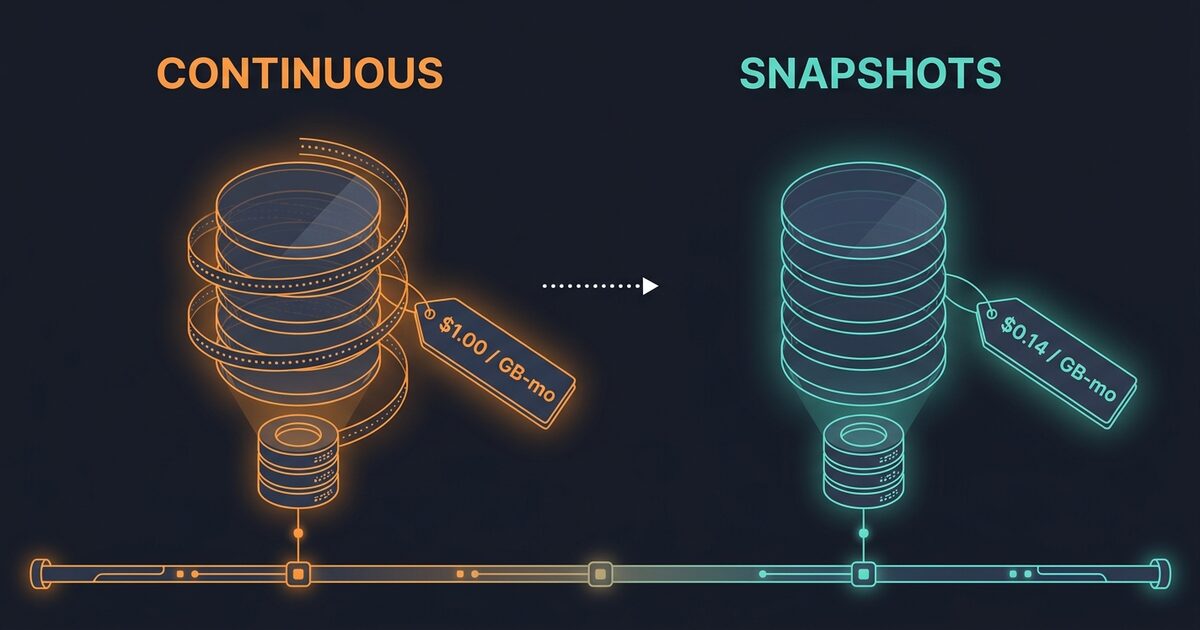
There is a BACKUP line on your MongoDB Atlas invoice, and if continuous cloud backup is switched on it is priced on a different schedule from the snapshots underneath it. The same 115 GB of backup data costs $16.10 a month as plain snapshots and $106.25 a month with continuous backup enabled. Your data did not change. The rate did.
Why continuous backup reprices every snapshot you keep
Atlas has two backup billing schedules, and a cluster is on one or the other.
Plain cloud backup bills snapshot storage at a flat per-GB-month rate that varies by provider and by region. On AWS that band runs $0.14 to $0.19. Google Cloud runs $0.08 to $0.12. Azure is the expensive one at $0.34 to $0.65, so an Azure cluster starts this exercise about two and a half times worse off than the same cluster on AWS.
Switch on continuous cloud backup, which is what buys you point-in-time restore, and Atlas stops using the flat rate for that cluster. It moves to a tiered schedule and applies it to the combined size of every snapshot plus the oplog. In AWS us-east-1 the tiers run: the first 5 GB free, then $1.00 per GB-month from 5 GB to 100 GB, then $0.75 per GB-month from 100 GB to 250 GB.
Put the two rates side by side. Snapshot storage that billed at $0.14 now bills at $1.00.
MongoDB's own worked example does the arithmetic. A cluster in us-east-1 holding 115 GB of combined snapshot and oplog storage pays 95 GB at $1.00 plus 15 GB at $0.75, which comes to $106.25 a month. That same 115 GB on the flat snapshot rate is 115 times $0.14, or $16.10. You are paying 6.6 times as much for the same bytes.
The free 5 GB sends small clusters the other way. Below roughly 5.8 GB of combined snapshot and oplog storage, continuous backup is the cheaper of the two schedules, because the free allowance covers more than the flat rate would have charged. Past that crossover the gap widens and never comes back.
Why the backup row appears every single day
Backup is quoted per GB-month and billed in GB days, which is why it shows up as a daily line item rather than a monthly one. The conversion is the monthly rate times 12, divided by 365.
At the $0.14 AWS rate that is $0.004603 per GB day. A 400 GB backup lands on your statement as 400 GB days at $0.004603, or $1.84 for that day, which is $55.20 across a 30-day month. Each backup retained on a given day contributes to that day's total. Seeing the same number arrive 30 times is the billing unit, not a duplicated charge.
Deleting snapshots frees less than you expect
Atlas snapshots are incremental. After the first one, a new snapshot stores the blocks that changed since the most recent snapshot. What you are billed for is the unique data across the whole retained set.
MongoDB states the consequence plainly: when you delete a snapshot, data in it that also exists in any other snapshot is still counted as unique data. A block stops billing only once every snapshot referencing it is gone.
Now look at the default backup policy Atlas hands a dedicated cluster:
| Frequency | Snapshot taken | Retained |
|---|---|---|
| Hourly | Every 6 hours, or 12 on NVMe | 7 days |
| Daily | Every day | 7 days |
| Weekly | Every Saturday | 4 weeks |
| Monthly | Last day of the month | 12 months |
| Yearly | Every 1 December | 1 year |
Five schedules run at once, all firing at 18:00 UTC by default. Counting them is less useful than it looks, because when two policy items would produce the same snapshot Atlas keeps one and files it under whichever item has the longest retention. The shape is what matters, and the shape is a short head and a very long tail.
The hourly snapshots are the most numerous, so they are what people delete first. They are also the cheapest, because six hours of change on a healthy cluster is a small delta.
The monthly schedule is the one sitting on your money. Twelve monthly snapshots reach back a year, and a block written thirteen months ago and deleted from the live collection since is still pinned by whichever monthlies reference it. Clear out every hourly and daily snapshot you own, and the monthly tail keeps that data billable.
Three more behaviours cost more than they look like they should.
Retention edits apply to future snapshots by default. Shorten monthly retention from 12 months to 3 and the nine snapshots already on disk keep their original expiry date. The Atlas CLI takes an explicit --updateSnapshots flag to apply new retention to snapshots that already exist. Skip it and your invoice will not move.
Cluster changes break incrementality. Atlas can retain more than one full snapshot per replica set, and the documented triggers include a failover, a change to the cluster tier, storage size or IOPS, a region priority change on a multi-region cluster, and cloud provider maintenance. Resizing a cluster down to save on compute forces a fresh full snapshot, so a right-sizing that trims your instance line can raise your backup line in the same billing period.
There is a ceiling, and it is the whole volume. Atlas can bill backup as high as the total storage capacity of the volume, depending on how the cloud provider stores the snapshots. A cluster that has lost incrementality several times over is not billing a rounding error above its data size. It is billing toward its disk size.
Find your backup share by hand
Everything below uses the Atlas Administration API v2 with an organization API key over HTTP digest auth. Atlas versions each endpoint separately and requires a versioned Accept header, so the version string changes from call to call. Send one Atlas does not recognise for that endpoint and you get a 406 rather than a helpful error.
Start with what backup actually costs you this month. The pending invoice is your live month-to-date bill:
export ATLAS_PUBLIC_KEY=... ATLAS_PRIVATE_KEY=...
ATLAS_ORG=<24-hex organization id>

curl -s -u "$ATLAS_PUBLIC_KEY:$ATLAS_PRIVATE_KEY" --digest \
  -H "Accept: application/vnd.atlas.2023-01-01+json" \
  "https://cloud.mongodb.com/api/atlas/v2/orgs/$ATLAS_ORG/invoices/pending" \
| jq '
  [.lineItems[] | {
      family: (if (.sku | test("BACKUP|SNAPSHOT|PIT")) then "backup" else "other" end),
      cents:  (.totalPriceCents // 0)
  }]
  | group_by(.family)
  | map({family: .[0].family, dollars: ((map(.cents) | add) / 100)})'
Atlas SKUs read like ATLAS_AWS_INSTANCE_M30 and ATLAS_AWS_DATA_TRANSFER_SAME_REGION, so the family is the middle token and a substring match catches the backup rows. Each line item also carries quantity, unit, unitPriceDollars, tierLowerBound and tierUpperBound, which is how tiered backup pricing arrives split across several rows. Backup above about a third of the invoice is where this is worth your afternoon.
Next, find out which schedule the cluster is on:
ATLAS_GROUP=<24-hex project id>
CLUSTER=<cluster name>

curl -s -u "$ATLAS_PUBLIC_KEY:$ATLAS_PRIVATE_KEY" --digest \
  -H "Accept: application/vnd.atlas.2024-08-05+json" \
  "https://cloud.mongodb.com/api/atlas/v2/groups/$ATLAS_GROUP/clusters/$CLUSTER/backup/schedule" \
| jq '{
    restoreWindowDays,
    policies: [.policies[] | {
      policyId: .id,
      items: [.policyItems[] | {
        id, frequencyType, frequencyInterval, retentionUnit, retentionValue
      }]
    }]
  }'
Keep those policyId and item id values. The CLI needs both to change a retention rule, and there is no way to guess them.
Whether the cluster uses continuous backup is a property of the cluster itself rather than of its backup schedule, which is the detail that sends people round in circles. pitEnabled is readable on the schedule response and settable only on the cluster:
curl -s -u "$ATLAS_PUBLIC_KEY:$ATLAS_PRIVATE_KEY" --digest \
  -H "Accept: application/vnd.atlas.2024-10-23+json" \
  "https://cloud.mongodb.com/api/atlas/v2/groups/$ATLAS_GROUP/clusters/$CLUSTER" \
| jq '{name, pitEnabled, backupEnabled}'
Last, see where the gigabytes actually sit:
curl -s -u "$ATLAS_PUBLIC_KEY:$ATLAS_PRIVATE_KEY" --digest \
  -H "Accept: application/vnd.atlas.2023-01-01+json" \
  "https://cloud.mongodb.com/api/atlas/v2/groups/$ATLAS_GROUP/clusters/$CLUSTER/backup/snapshots?itemsPerPage=500" \
| jq -r '.results
  | group_by(.frequencyType)
  | map({
      frequency: .[0].frequencyType,
      count: length,
      gb: ((map(.storageSizeBytes // 0) | add) / 1073741824 | floor)
    })
  | sort_by(-.gb)[]
  | "\(.frequency)\t\(.count)\t\(.gb) GB"'
storageSizeBytes is the number of bytes taken to store that backup at the time of the snapshot. Those figures do not add up to your billed unique data, because a block shared by four snapshots is counted in all four here and billed once by Atlas. Read the ranking, not the total. It tells you which frequency owns the tail.
Shorten the tail without giving up your recovery point
Decide the recovery point objective before you touch anything. Continuous backup buys restore to any second inside the restore window, and that window is capped by your hourly snapshot retention, which is 7 days on the default policy. If the honest answer to "how much data can we afford to lose" is "back to last night's daily snapshot", you are paying the tiered rate for a guarantee nobody asked for.
Turning it off moves the cluster back to the flat snapshot rate. It is a PATCH on the cluster, and the body is a partial update:
curl -s -u "$ATLAS_PUBLIC_KEY:$ATLAS_PRIVATE_KEY" --digest -X PATCH \
  -H "Accept: application/vnd.atlas.2024-10-23+json" \
  -H "Content-Type: application/json" \
  "https://cloud.mongodb.com/api/atlas/v2/groups/$ATLAS_GROUP/clusters/$CLUSTER" \
  -d '{"pitEnabled": false}'
Rollback is the same call with true, and Atlas starts a fresh oplog window from that moment. The restore window rebuilds going forward, so flipping it back does not hand you point-in-time coverage over the gap you just created. Run this on a cluster whose daily snapshots you have actually tested a restore from.
Then trim the retention tail that holds the gigabytes. The CLI wants the policy id, the policy item id, and the whole replacement rule:
atlas backups schedule update \
  --clusterName "$CLUSTER" \
  --projectId "$ATLAS_GROUP" \
  --updateSnapshots \
  --policy <policyId>,<policyItemId>,monthly,1,months,3
That trims monthly retention from twelve months to three. --updateSnapshots is the flag doing the work: it applies the new retention to the monthly snapshots already sitting on disk. Run the same command with --noUpdateSnapshots and you have changed a policy without changing a bill.
Rolling back a retention cut is where the asymmetry bites. Re-running the command with the original retentionValue restores the policy, and the snapshots the trim already expired do not come back. Change one frequency at a time, let a full billing day pass, and read the pending invoice again before you touch the next one.
The feedback loop is the awkward part of this cleanup. Unique data means your bill responds to which snapshots are gone rather than how many, so the honest workflow is one retention change, one day, one look at the invoice.
A quick decision tree
graph TD
  A[Backup SKUs over ~30% of the Atlas invoice] --> B{pitEnabled on the cluster?}
  B -- No --> F[Trim the monthly and yearly tail]
  B -- Yes --> C{Snapshot plus oplog over 5.8 GB?}
  C -- No --> D[The free 5 GB wins. Leave continuous on]
  C -- Yes --> E{Does the RPO need second-level restore?}
  E -- Yes --> F
  E -- No --> G[Set pitEnabled false, back to the flat rate]
  F --> H{Retention change sent with --updateSnapshots?}
  H -- No --> I[Existing snapshots keep their expiry. Bill will not move]
  H -- Yes --> J[Re-read the pending invoice after a full billing day]
Related reading
The same shape turns up wherever a retention or tier decision is made once and then quietly bills forever.
- S3 Standard-IA lifecycle rules is the same trade-off on object storage, where a minimum duration rather than unique data is what makes an early move cost you.
- Snowflake AUTO_SUSPEND covers the other managed-service default that bills for a capability you are not using.
Common questions
Does turning off continuous cloud backup delete my snapshots?
No. Disabling pitEnabled stops the oplog capture that powers second-level restore and moves the cluster onto the flat snapshot rate. The snapshots already taken stay until their retention policy expires them, and scheduled snapshots keep running on the same policy. What you give up is restore to an arbitrary point in time between two snapshots.
Why did my Atlas backup bill go up after resizing a cluster?
Because a change to the cluster tier, storage size or IOPS is one of the documented triggers for Atlas keeping an extra full snapshot. Snapshots are normally incremental, so a full one adds the whole data size again rather than a delta. Failover, a multi-region priority change and cloud provider maintenance do the same thing.
How far back can continuous cloud backup restore?
To any second inside the restore window, which is set by restoreWindowDays and cannot exceed the hourly snapshot retention time. The default policy retains hourly snapshots for 7 days, so 7 days is the default ceiling.
Does deleting one snapshot reduce my Atlas backup bill?
Only for blocks that no other retained snapshot references. Atlas counts data that also exists in another snapshot as unique data, so it keeps billing until every snapshot referencing it is gone. This is why deleting many hourly snapshots often moves the bill less than shortening one monthly retention rule.
Why does the same backup charge appear on my invoice every day?
Backup is quoted per GB-month and billed in GB days. The rate is the monthly figure times 12, divided by 365, and every backup retained on a given day contributes to that day's GB days. The repeated rows are the billing unit rather than a duplicated charge.
How OhChimp approaches this
OhChimp reads your Atlas pending invoice through a read-only organization key, splits the real billed cents by SKU family, and raises the backup share once snapshot and backup SKUs cross about a third of month-to-date spend. It ranks your clusters by what they actually billed, and flags dedicated clusters running without compute autoscaling so tier changes get planned rather than found on next month's backup line. Each finding arrives as a reviewable plan with a risk level and rollback steps, and nothing changes until you press apply. The saving is then measured against your real Atlas invoice.
See how the connection works on the MongoDB Atlas integration page.